
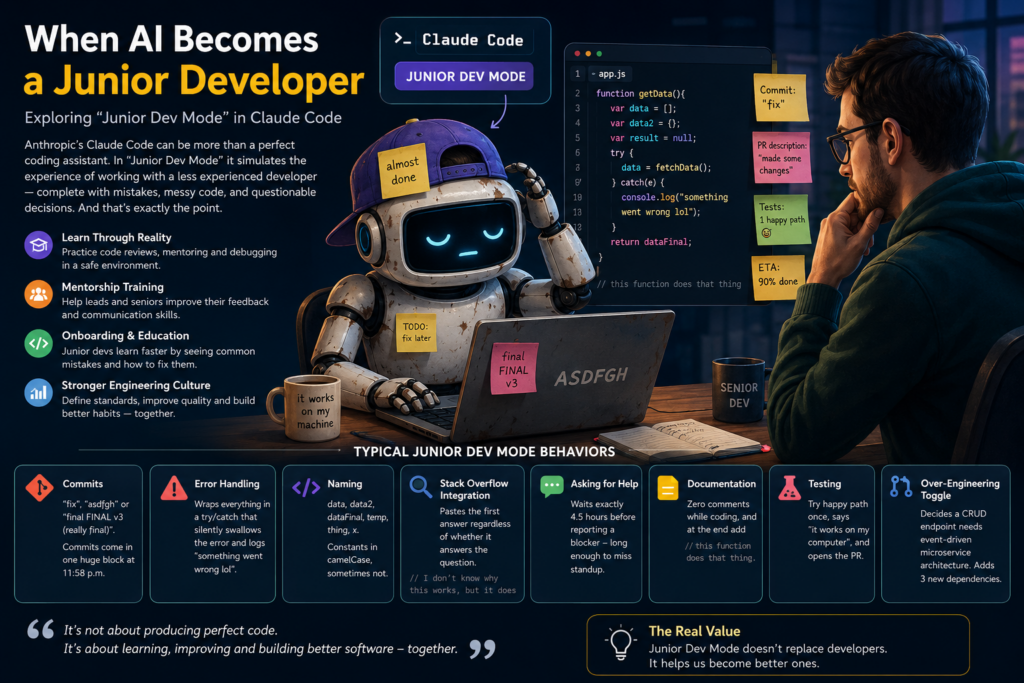
Artificial intelligence is rapidly changing the way software is designed, written, tested and maintained. Tools such as Claude Code, GitHub Copilot, Cursor and ChatGPT have already become part of the daily workflow for many developers. They can generate code, explain complex functions, refactor legacy systems, write tests, create documentation and even help with debugging.
But there is an interesting question emerging in the software development world:
What happens when AI stops trying to act like the perfect senior engineer and instead behaves like a junior developer?
This idea, sometimes discussed under the humorous name “junior dev mode,” may sound like a joke at first. Why would anyone want an AI assistant that makes mistakes, writes unclear commit messages, forgets edge cases, overcomplicates simple features or opens a pull request with the description “made some changes”?
Yet behind the satire there is a serious and important point. Software development is not only about writing correct code. It is also about reviewing imperfect work, mentoring others, identifying hidden problems, communicating clearly, debugging unexpected behavior and improving the quality of a solution over time.
In that sense, a “junior dev mode” could become one of the most realistic ways to train developers, technical leads and engineering teams.
From Perfect Assistant to Realistic Teammate
Most AI coding tools are designed to help developers move faster. They try to generate the best possible answer, write working code, explain decisions and reduce repetitive work.
Claude Code, for example, is positioned as an agentic coding tool that can work directly with a codebase, edit files, run commands, write tests, fix bugs and assist with everyday development tasks. This kind of tool changes the development process because it does not simply answer questions. It participates in the workflow.
But real software teams do not consist only of perfect contributors. Real teams include different levels of experience, different communication styles and different levels of technical maturity.
A junior developer often brings energy, curiosity and fresh thinking, but also needs guidance. Their work may include incomplete solutions, inconsistent naming, missing tests, unclear documentation or architectural decisions that need review. This is normal. It is part of learning.
A simulated junior developer experience could help senior developers and team leads practice one of the most important skills in software engineering: improving the work of others without simply rewriting everything themselves.
Why Would Anyone Want an AI That Makes Mistakes?
At first, the idea sounds counterintuitive. The whole promise of AI coding assistants is productivity. Developers want fewer bugs, not more. They want cleaner code, not confusing variable names. They want faster delivery, not additional mentoring work.
However, software education often fails because it presents development as too clean and linear.
In tutorials, everything works.
In documentation, examples are simple.
In online courses, tasks are isolated.
In real projects, everything is connected, messy and full of trade-offs.
A junior developer simulation would not be useful because it produces production-ready code. It would be useful because it reproduces the kind of imperfect thinking that teams face in real life.
This creates a training environment where developers can practice:
- Reviewing code
- Detecting bugs
- Improving architecture
- Explaining better solutions
- Writing constructive feedback
- Refactoring unclear logic
- Identifying missing edge cases
- Improving tests
- Turning vague work into professional delivery
In other words, the value is not in the mistake itself. The value is in learning how to recognize and correct it.
The Comedy Is Familiar Because the Problem Is Real
Every software team has seen some version of this.
A commit message that says only:
“fix”
A pull request description that says:
“made some changes”
A variable called:
dataFinal2
An error handler that catches everything and logs:
“something went wrong”
A feature that has been “almost done” for four days.
A task that suddenly turns from a simple CRUD endpoint into a microservice architecture with three new dependencies and an event bus.
These examples are funny because they are familiar. But they also represent real issues in software development: unclear communication, weak planning, poor technical judgment, missing standards and lack of experience.
A good senior developer does not only write better code. A good senior developer helps the team improve its thinking.
That is where the “junior dev mode” concept becomes interesting.
Learning Through Imperfection
Mistakes are one of the most powerful learning tools in programming.
A developer who only sees perfect code may not understand why standards matter. But a developer who has to debug unclear logic, review a poorly structured pull request or refactor duplicated code quickly learns the importance of quality.
A junior developer simulation could be used in several practical ways.
1. Code Review Training
Code review is a skill. It requires technical knowledge, communication and judgment.
A virtual junior developer could generate imperfect pull requests that trainees need to review. The goal would not be to shame the code, but to identify problems and explain improvements.
For example:
- Is the code readable?
- Are the names clear?
- Are edge cases handled?
- Are tests included?
- Is the solution overengineered?
- Does the implementation match the requirement?
- Is the pull request easy to understand?
- Are there security or performance risks?
This could help new team leads learn how to give feedback that is specific, respectful and useful.
2. Mentorship Practice
Many senior developers are promoted because they are technically strong, but mentoring requires a different skillset.
Mentors need patience. They need to explain why something matters. They need to guide without discouraging. They need to help juniors think better, not only deliver faster.
A simulated junior developer could help mentors practice these conversations in a low-risk environment.
Instead of waiting for real mistakes in a real project, mentors could work through realistic scenarios:
- A junior misunderstood the requirement
- A junior solved the wrong problem
- A junior copied code without understanding it
- A junior created a security risk
- A junior is blocked but waited too long to ask for help
- A junior says something is finished, but tests are missing
This makes mentorship more structured and practical.
3. Better Onboarding for Junior Developers
Junior developers can also benefit from this type of simulation.
When they see typical beginner mistakes from the outside, they can better understand what professional standards look like.
They can compare weak and strong examples of:
- Commit messages
- Pull request descriptions
- Error handling
- Test coverage
- Naming conventions
- Documentation
- Refactoring
- Asking for help
- Estimating task progress
This can make onboarding more realistic and less theoretical.
4. Team Standards and Engineering Culture
A “junior dev mode” could also help teams define what quality means inside their organization.
Many companies say they want “clean code,” but the definition is often unclear. By reviewing simulated mistakes, teams can create shared standards:
- What is a good pull request?
- What is an acceptable commit message?
- When should someone ask for help?
- What must be tested before opening a PR?
- What documentation is required?
- What is overengineering in our context?
- What naming conventions do we follow?
This transforms abstract engineering principles into concrete team habits.
What Junior Dev Mode Might Look Like
If implemented as a structured training tool, junior dev mode could include different types of behavior.
Commit Behavior
The simulated developer might create unclear or unhelpful commit messages such as:
“fix”
“asdfgh”
“final version”
“final FINAL v3”
This would give teams the opportunity to teach why commit history matters and how good commit messages help future debugging and collaboration.
Error Handling
The simulated developer might wrap everything in a generic try/catch block and hide the real error.
This creates a learning moment around observability, logging, debugging and responsible failure handling.
Naming and Code Clarity
Variables such as data, thing, temp, x and dataFinal can help demonstrate why naming is not cosmetic. Good names reduce cognitive load and make software easier to maintain.
Copy-Paste Coding
The simulated developer might paste an online solution without understanding whether it fits the problem.
This creates a discussion around context, security, dependencies and technical ownership.
Asking for Help Too Late
One of the most common junior mistakes is waiting too long before reporting a blocker.
A realistic simulation could help teams teach a healthier communication rule: try independently, document what you attempted, then ask for help early enough to protect the sprint.
Weak Pull Request Descriptions
A pull request with no context, no screenshots, no testing notes and no link to the task is not only inconvenient. It slows down the entire team.
A training simulation could show how better PR descriptions improve review quality and reduce back-and-forth communication.
Overengineering
Sometimes junior developers overcomplicate simple requirements because they want to use new technologies or prove technical ability.
A junior dev simulation could intentionally turn a simple feature into an unnecessarily complex solution, helping teams discuss simplicity, maintainability and business value.
“Almost Done” Syndrome
Every task being “90% done” for half of the sprint is a familiar software development problem.
This could be used to teach better progress reporting, task breakdown and risk communication.
The Serious Point Behind the Satire
The humorous side of junior dev mode is obvious. It reflects the everyday frustrations of software teams.
But the deeper message is more important.
The value of a developer is not only in writing code. It is in understanding context, making decisions, communicating with others, managing trade-offs and improving systems over time.
AI can increasingly generate code. But professional software development still requires:
- Product understanding
- Architecture thinking
- Security awareness
- Business logic interpretation
- Testing discipline
- Team communication
- Long-term maintainability
- Ethical judgment
- Responsibility for outcomes
A junior dev simulation reminds us that code is only one part of the job.
AI as a Training Partner, Not Only a Productivity Tool
The future of AI in software development may not be limited to faster coding.
It may also reshape how developers learn.
Imagine an AI system that can simulate different team roles:
- A junior developer who needs mentoring
- A senior developer who challenges architecture
- A QA engineer who finds edge cases
- A product owner who changes requirements
- A security reviewer who identifies risks
- A DevOps engineer who questions deployment decisions
This would turn software education into an interactive environment where students and professionals learn by working with virtual colleagues.
Instead of only reading theory, developers could practice realistic collaboration.
This is where AI becomes more than an assistant. It becomes a simulator for professional experience.
Not for Production, But Valuable for Learning
It is important to be clear: a mode that intentionally creates incomplete or flawed solutions should not be used in production environments.
Production software needs reliability, security, testing and quality control.
But as a training tool, this concept has real potential.
It could be used by:
- Software development bootcamps
- Universities
- Internal engineering academies
- Technical leads
- QA teams
- Code review training programs
- Companies onboarding junior developers
- Senior developers practicing mentorship
The goal would not be to create bad code. The goal would be to create teachable situations.
What This Means for Companies
For companies, the rise of AI coding tools creates both an opportunity and a challenge.
The opportunity is clear: faster development, better support for repetitive tasks, easier prototyping and improved access to technical knowledge.
The challenge is that teams still need engineering judgment.
If developers blindly accept AI-generated code, they may introduce bugs, security risks or unnecessary complexity. But if they use AI critically, they can improve productivity while maintaining quality.
This is why training becomes essential.
AI tools should not only be introduced as shortcuts. They should be introduced as part of a disciplined development process that includes review, testing, documentation and architecture standards.
Final Thoughts
The idea of “junior dev mode” may sound like satire, but it points to something real.
Software development is not perfect. Teams are not perfect. Requirements are not perfect. Code is rarely perfect on the first attempt.
And that is exactly why learning through mistakes matters.
If AI can simulate not only correct answers, but also realistic development challenges, it could become a powerful educational tool. It could help senior developers become better mentors, junior developers understand professional standards faster and teams define what quality really means.
In the end, junior dev mode may not accelerate software development directly.
But it could improve the way we learn software development.
And in an industry where mistakes are often the best teachers, that may be just as valuable.
References and Useful Reading
- Anthropic — Claude Code Overview
- Anthropic — Claude Code Output Styles
- Anthropic — Claude Code Common Workflows
- Anthropic — Claude Code Settings
- Anthropic — Claude Code Skills
- Anthropic Engineering — Sandboxing and safer autonomous coding
- The Verge — Claude Code auto mode coverage
- Research papers on Claude Code, AI coding agents and software development workflows