
Video content is becoming one of the most powerful formats for digital communication. Audiences are consuming short videos on TikTok, Instagram Reels, YouTube Shorts, LinkedIn, and other social media platforms every day. At the same time, businesses, publishers, marketing teams, and content creators are under pressure to produce more content, more often, and in multiple formats. This is where n8n AI automation can make a real difference.
With the right workflow, a written newsletter, blog post, article, or report can be automatically transformed into a short, professional video recap delivered by an AI avatar. No camera. No studio. No microphone. No manual editing. No daily recording routine.
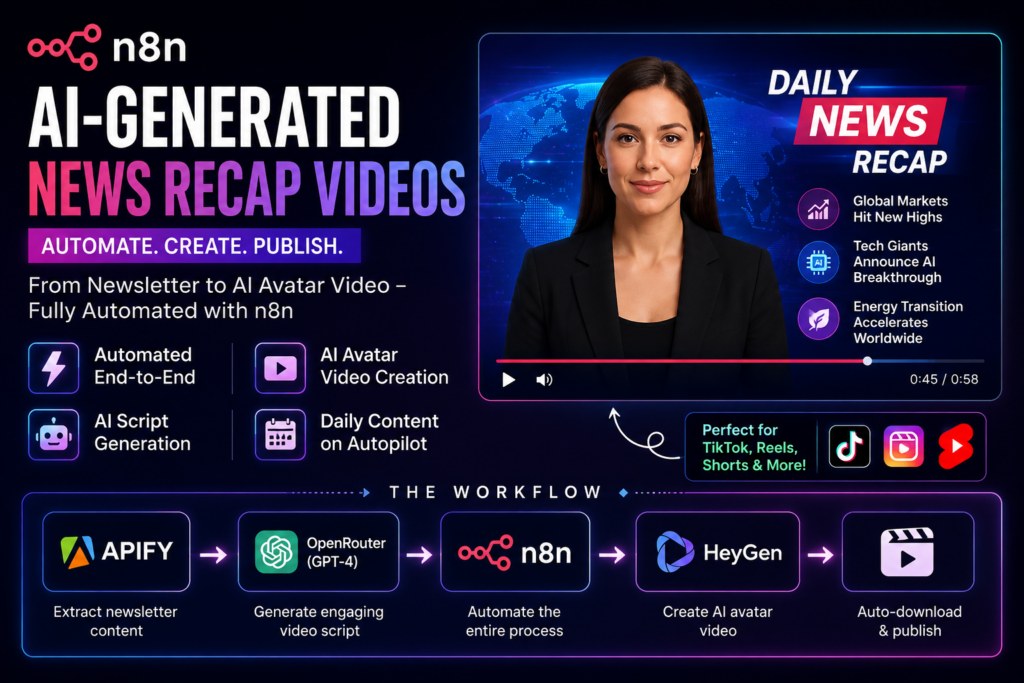
This article explains how an n8n workflow can automate the creation of AI-generated news recap videos using Apify for content scraping, OpenRouter and GPT-based models for script writing, and HeyGen for AI avatar video generation.
What This Workflow Does
This n8n workflow automates the entire process of creating short AI-generated news recap videos.
The workflow can collect content from a daily newsletter such as Morning Brew, extract the most important stories, use artificial intelligence to write a short video script, and send that script to HeyGen to create a professional avatar-based video.
Instead of manually reading the newsletter, selecting the top stories, writing a script, recording a video, editing the clip, and preparing it for social media, the workflow handles the process automatically.
The result is a repeatable content automation system that can generate fresh video summaries on a daily basis.
Why This Matters for Businesses and Content Teams
Many companies already create written content, but not all of them repurpose that content into video. This is a missed opportunity.
A blog post can become a video summary.
A newsletter can become a daily news digest.
A report can become a short executive recap.
A product update can become a social media video.
An industry article can become a LinkedIn video post.
The problem is that video production usually requires time, equipment, and people. For many teams, this makes daily video content difficult to maintain.
AI video automation solves that problem by creating a structured production pipeline. Once the workflow is configured, the content team can focus on strategy, quality, and distribution instead of repetitive manual production.
Main Use Cases
1. Daily News Digest Videos
The workflow can automatically convert daily newsletter content into short-form video recaps. For example, a business newsletter can be transformed into a 30- to 60-second video featuring the top stories of the day.
This type of content is ideal for:
- TikTok
- Instagram Reels
- YouTube Shorts
- internal company updates
- website news sections
For media companies, agencies, and industry experts, this creates a simple way to publish consistent daily video content.
2. Content Repurposing
Many businesses invest time in writing blog posts, articles, whitepapers, research summaries, and reports. However, most of that content stays in written format only.
With this workflow, written content can be automatically repurposed into video.
For example:
- a blog post can become a short video summary
- a market report can become an executive briefing
- an industry article can become a LinkedIn video
- a technical update can become a customer education clip
- a long newsletter can become a short social media recap
This allows companies to get more value from every piece of content they already produce.
3. Automated Social Media Content
Consistency is one of the biggest challenges in social media marketing. Businesses often start with a good content plan but struggle to maintain daily or weekly publishing.
An AI video automation workflow can help by generating regular video updates without requiring someone to record content every time.
This is especially useful for:
- digital agencies
- consultants
- publishers
- SaaS companies
- e-commerce brands
- B2B companies
- educational platforms
- industry news portals
The workflow can be scheduled to run daily, weekly, or whenever new content is available.
How the Workflow Works
The workflow operates in three main stages:
- Content acquisition
- Script generation
- Video production
Each stage is handled by a different part of the automation pipeline.
Stage 1: Content Acquisition with Apify
The first stage is content acquisition.
The workflow uses Apify Web Scraper to fetch the latest content from a selected source. In this example, the source can be a newsletter such as Morning Brew, but the same logic can be applied to many other content sources.
The scraper can collect page content and extract it in a structured format, such as markdown or plain text. This gives the AI model a clean input that can be processed in the next stage.
The source can be changed depending on the purpose of the workflow.
Possible content sources include:
- newsletters
- blog posts
- online magazines
- RSS feeds
- company news pages
- press releases
- industry reports
- public websites
- product update pages
The key is to collect relevant content in a format that the AI model can understand and summarize.
Stage 2: AI Script Generation with OpenRouter and GPT-Based Models
After the content is collected, the workflow sends it to an AI agent that generates the video script.
The AI agent analyzes the newsletter or article content and identifies the most relevant stories. It then creates a short script written in a conversational tone.
For short-form video, the script should be concise. A good target is usually 40 to 60 words. This keeps the final video clear, fast, and suitable for platforms where attention spans are short.
The AI prompt can instruct the model to:
- select the top 2 to 4 stories
- write in a natural spoken tone
- avoid unnecessary details
- keep the script short
- make the opening engaging
- use simple language
- create a smooth flow between stories
- end with a strong closing line
A sample instruction could be:
“Analyze the following newsletter content and write a 40-60 word video script summarizing the top 2-4 stories. Use a clear, engaging, conversational tone suitable for a short-form social media video.”
This stage is important because the quality of the final video depends heavily on the quality of the script. A good AI prompt creates a better presenter script, which creates a better video.
Stage 3: AI Video Production with HeyGen
Once the script is ready, the workflow sends it to HeyGen’s API.
HeyGen generates a video featuring an AI avatar delivering the script. The avatar can be selected from available options, and the voice can be customized depending on the target audience, brand tone, language, and content style.
This makes it possible to create professional-looking video content without filming a person on camera.
The workflow can also include polling logic. This means that after the video generation request is submitted, n8n checks the status of the video until it is ready. Once HeyGen completes the video, the workflow can continue to the next step.
The completed video can then be downloaded, stored, reviewed, published, or sent to another automation workflow.
Why n8n Is Ideal for This Type of Automation
n8n is a strong choice for this workflow because it allows different systems to work together in one visual automation process.
Instead of writing a custom backend from scratch, teams can use n8n to connect:
- web scraping tools
- AI models
- video generation APIs
- cloud storage
- email notifications
- content management systems
- approval flows
- social media publishing tools
- databases
- internal dashboards
This makes the workflow easier to build, test, adjust, and expand.
For technical teams, n8n also allows more control than simple no-code tools. It can use HTTP requests, API credentials, custom logic, conditional flows, retries, scheduling, and data transformations.
Customization Options
One of the strongest parts of this workflow is flexibility. It can be adapted for different brands, platforms, industries, and content types.
Avatar and Voice Selection
The workflow can include “Get Avatars” and “Get Voices” nodes to browse available HeyGen presenters and voices.
This allows the business to select a presenter that fits the brand identity.
For example:
- a professional avatar for B2B updates
- a friendly avatar for social media content
- a formal voice for corporate briefings
- an energetic voice for short-form video platforms
- a multilingual voice for international audiences
The avatar and voice can also be changed depending on the content category.
Content Source
The content source can be modified easily.
Instead of Morning Brew, the workflow can scrape or read content from:
- a company blog
- an RSS feed
- a news website
- a Google Sheet
- a CMS
- a Notion page
- a public report
- an internal document
- a product update page
This makes the workflow useful beyond news summaries. It can support marketing, sales, customer education, employer branding, internal communication, and executive reporting.
Script Style
The AI prompt can be adjusted to control the tone and format of the video script.
Possible styles include:
- professional
- conversational
- energetic
- educational
- humorous
- executive summary
- breaking news style
- social media influencer style
- corporate briefing style
The prompt can also control length, structure, vocabulary, and call-to-action.
For example, a LinkedIn video may need a more professional tone, while TikTok or Instagram Reels may need a faster and more engaging tone.
Video Dimensions
Different platforms require different video formats.
The workflow can be configured for:
- portrait video for TikTok, Reels, and Shorts
- landscape video for YouTube and website publishing
- square video for social feeds
- custom dimensions for paid ads or internal screens
This allows one automation pipeline to support multiple distribution channels.
Prerequisites
To build this workflow, the following accounts and API credentials are required:
HeyGen API Key
HeyGen is used to generate the avatar video. The API key allows n8n to send the script, avatar selection, voice selection, and video configuration to HeyGen.
OpenRouter API Key
OpenRouter is used to access AI models that generate the script. The workflow can use GPT-based models or other supported language models depending on the desired cost, speed, and quality.
Apify Token
Apify is used for web scraping and content extraction. The token allows n8n to run the scraper and collect the source content automatically.
n8n Instance
The workflow requires an n8n instance. This can be self-hosted or cloud-hosted, depending on the business requirements.
A self-hosted n8n setup is often preferred when a company wants more control over data, credentials, and workflow logic.
Suggested Workflow Structure
A practical version of this workflow may include the following nodes:
- Schedule Trigger
Runs the workflow daily or at a selected time. - Apify Web Scraper
Fetches the latest content from the selected newsletter, website, or feed. - Content Cleaner
Removes unnecessary formatting, empty sections, tracking elements, or repeated text. - AI Script Writer
Uses GPT-based AI to generate a short video script. - Script Review Logic
Checks whether the script is within the desired word count and format. - HeyGen Create Video Request
Sends the script, avatar ID, voice ID, and video settings to HeyGen. - Polling Node
Checks whether the video generation is complete. - Video URL Retrieval
Collects the final video URL once rendering is complete. - Storage or Notification
Saves the video link, sends an email or Slack message, or stores it in a database. - Optional Approval Step
Allows a human reviewer to approve the video before publishing. - Optional Publishing Step
Uploads or schedules the video to a social media platform or content library.
Adding Human Review Before Publishing
Although this workflow can be fully automated, many businesses should include a human approval step before the video goes live.
This is especially important for:
- financial content
- medical content
- legal content
- sensitive news
- corporate communication
- regulated industries
- client-facing campaigns
The automation can generate the video automatically, but a human can review the result before it is published.
This creates a balance between speed and quality control.
Benefits of AI-Generated News Recap Videos
Faster Content Production
The workflow reduces the time required to create a video from hours to minutes. This allows teams to publish more frequently without increasing workload.
Lower Production Costs
There is no need for daily filming, studio equipment, camera setup, or manual editing for every update.
Consistent Publishing
The workflow can run every day at the same time, helping brands maintain a consistent publishing rhythm.
Better Content Repurposing
Existing written content can be transformed into video, increasing reach across different platforms.
Scalable Video Creation
The same workflow can be adapted for multiple topics, languages, avatars, and content sources.
Brand Differentiation
Companies using AI-generated video summaries can present themselves as innovative, modern, and digitally advanced.
Business Examples
For a Digital Agency
A digital agency can automatically create weekly marketing news videos for its audience. The workflow can collect industry updates, write a short summary, generate an avatar video, and prepare it for social media.
For a Financial Consultant
A consultant can generate daily market recap videos based on selected financial news sources. The video can be shared with clients or posted on LinkedIn.
For an E-Commerce Brand
An e-commerce company can convert product updates, promotions, or industry trends into short video announcements.
For a Corporate Communication Team
A company can create internal video briefings for employees, summarizing important updates, events, and leadership announcements.
For a Publisher
An online publisher can automatically create video summaries of top articles and use them to drive traffic back to the website.
Important Considerations
Copyright and Content Rights
Businesses should ensure they have the right to scrape, summarize, repurpose, and publish content from selected sources. Not every website or newsletter permits automated reuse of its content.
For commercial use, it is better to use owned content, licensed sources, public RSS feeds, or partner-approved content.
Accuracy and Fact-Checking
AI-generated scripts should be reviewed, especially when dealing with news, finance, health, law, or sensitive business information.
Automation should not replace editorial responsibility.
Brand Voice
The AI prompt should be carefully designed so the script matches the company’s brand tone. A formal B2B company and a lifestyle media brand should not use the same script style.
Data Privacy
If the workflow processes internal documents, reports, or confidential content, the company must ensure that API usage, storage, and data handling are compliant with internal policies and applicable regulations.
Platform Optimization
Different platforms require different video pacing, length, captions, aspect ratios, and hooks. The workflow should be adapted based on where the videos will be published.
How 4Virtus Can Help
At 4Virtus, we design and implement practical AI automation workflows for businesses that want to save time, improve productivity, and create scalable digital processes.
An AI-generated video recap workflow can be customized for your brand, your content sources, your preferred avatar, your voice style, and your publishing strategy.
We can help with:
- n8n workflow design
- self-hosted n8n setup
- API integrations
- Apify scraper configuration
- AI prompt engineering
- HeyGen API integration
- video automation logic
- approval workflows
- content publishing automation
- social media automation
- monitoring and error handling
- documentation and training
Whether you want to automate daily news videos, repurpose blog posts, create internal updates, or build a complete AI-powered content production system, this type of workflow can become a valuable part of your digital marketing operations.
Conclusion
AI-generated video automation is not just a trend. It is a practical way to produce more content, reduce manual work, and reach audiences across modern digital channels.
By combining n8n, Apify, OpenRouter, GPT-based script generation, and HeyGen avatar video production, businesses can transform written content into professional short-form videos with minimal manual effort.
The future of content marketing will not only be about creating more content. It will be about creating smarter systems that turn one idea into multiple formats automatically.
For companies that want to scale communication, improve visibility, and stay ahead of the digital curve, AI video automation is a powerful place to start.